
Overview
Murder Mystery 2 occasionally releases redeemable codes for coins, knives, or event items. The redeem path is similar to other Roblox shop-based games: join a server, open the in-game shop or Codes UI, then paste.
MM2 is quieter on codes than Blox Fruits — if our list shows only expired entries, wait for the next update rather than guessing random strings.
Related: MM2 codes list · MM2 trading tips · MM2 trade calculator
Steps
- 1
Load into Murder Mystery 2
Join a lobby or round so the full HUD is available. Codes are validated by the live game server.
- 2
Open the shop or Codes menu
From the lobby HUD, open Shop (or the equivalent Codes button if one is present). Look for a Redeem / Codes field. Layout can change after seasonal updates, but it remains inside the shop cluster rather than Roblox settings.
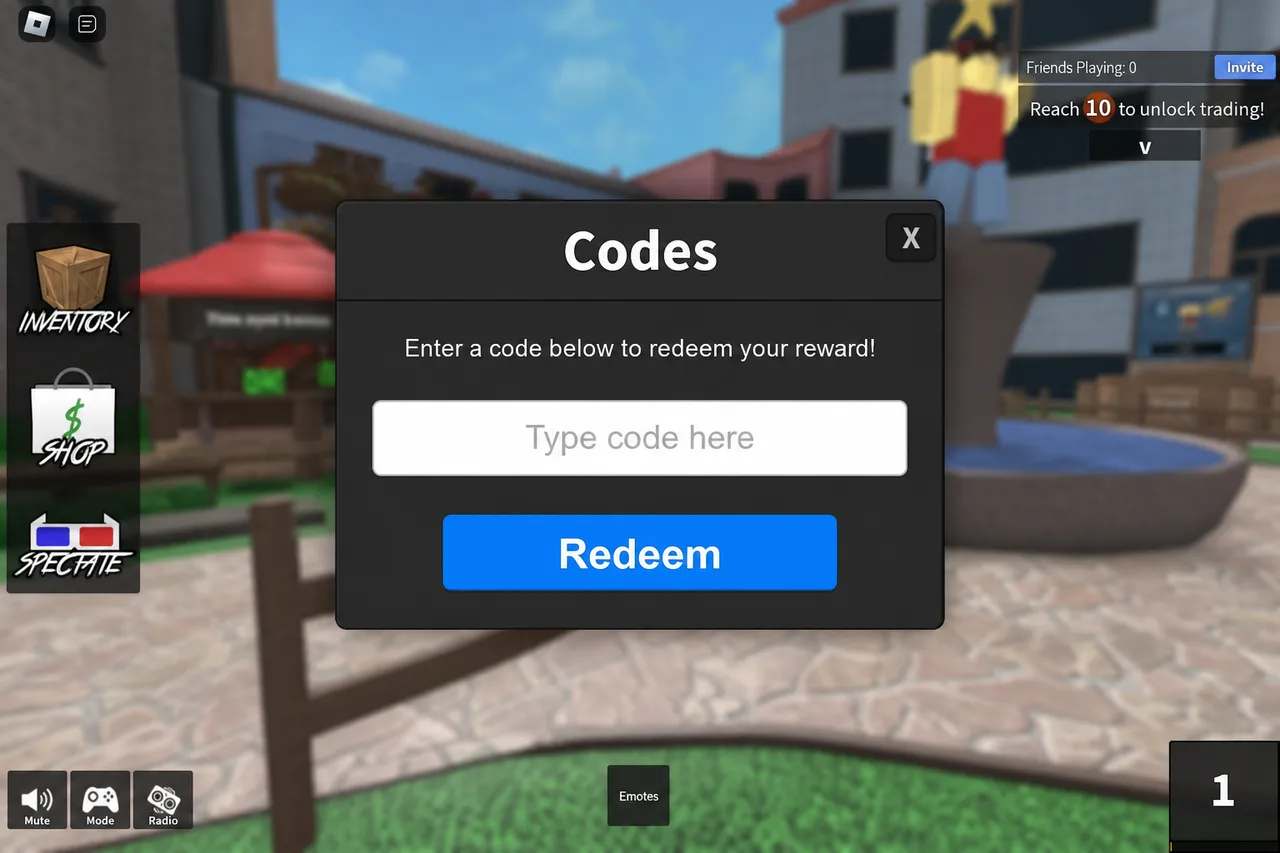
MM2 uses a shop-style redeem field similar to other Roblox games. - 3
Paste a working code
Copy a code marked working from our MM2 list. Paste once, redeem, then check coins or inventory. Skip anything marked expired.
Tips
- If you cannot find Codes, the game may have no active promo UI right now — check the codes page date.
- Trading knives is separate from code redeeming; do not share account passwords for “free godlies.”
- See /codes/murder-mystery-2 for the current list.
FAQ
- Does MM2 always have codes?
- No. Codes appear around updates and events. Use the working list to see what is live instead of trying old YouTube codes.
- Are MM2 codes the same on mobile?
- Yes. Redeem in-game on any supported device once the shop/Codes UI is open.
Shop on Mystery Market
Full catalog →Pay with card — no Discord account required.